Anker 332 USB-C Hub Review: The Essential 5-in-1 Dongle for MacBook & Windows Laptops
Modern laptops are sleek, powerful, and portable. But they often sacrifice one crucial thing: ports. If you’re tired of carrying multiple dongles or struggling to connect your peripherals, the Anker 332 USB-C Hub (5-in-1) might be the perfect solution. As a compact, reliable, and affordable hub, it promises to expand your connectivity without weighing down your bag.
In this extensive review, we’ll dive deep into its features, performance, and whether it’s worth your money.
At a Glance: Key Features
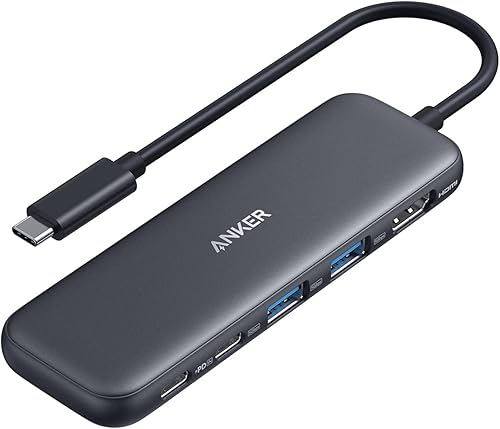
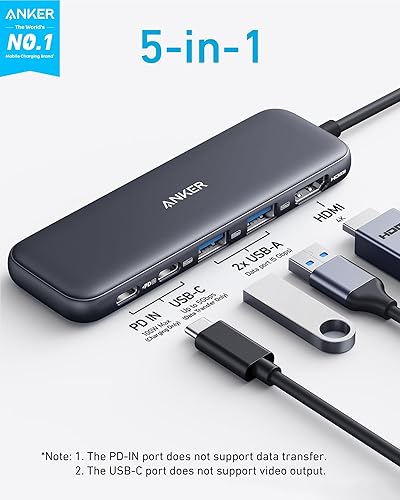
- 5-in-1 Connectivity: HDMI, USB-C Data, 2x USB-A Data, 100W PD-IN.
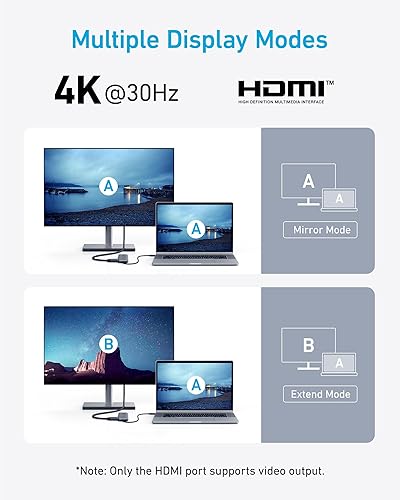
- 4K Display: HDMI port supports up to 4K@30Hz.
- Fast Charging: Supports up to 100W PD input (85W pass-through charging to laptop).
- High-Speed Data: Transfer files at up to 5 Gbps via USB-C and USB-A ports.
- Universal Compatibility: Works with MacBook, iPad, Windows, ChromeOS, and Linux.
Pros & Cons
✅ Pros
- ➕ Compact & Lightweight: Fits easily in any pocket or sleeve.
- ➕ 85W Pass-Through Charging: Powers most laptops at full speed.
- ➕ Reliable Build: Durable construction typical of Anker products.
- ➕ Versatile Ports: Mix of USB-A and USB-C data ports covers most needs.
- ➕ Affordable: Great value for a trusted brand hub.
❌ Cons
- ➖ HDMI Limited to 30Hz: 4K output is at 30Hz, not smooth 60Hz.
- ➖ No Ethernet: Lacks a wired internet port.
- ➖ No SD Card Slot: Photographers will need a separate reader.
- ➖ Short Cable: Fixed cable might be short for some desktop setups.
Detailed Review
Design & Build Quality
The Anker 332 continues Anker’s tradition of solid build quality. It features a sleek, matte black finish that resists fingerprints and looks professional next to any laptop. It’s incredibly slim—about the size of a candy bar—making it an ideal travel companion. The attached USB-C cable is sturdy, though fixed, which is standard for hubs in this class.
Performance: Charging & Data
One of the standout features is the 100W Power Delivery (PD) input. It allows you to plug your laptop’s charger directly into the hub, which then passes up to 85W to your laptop (the hub reserves 15W for its own operation). This is plenty of power for MacBook Airs, MacBook Pros (13/14-inch), and most Windows ultrabooks like the Dell XPS 13.
For data, you get two USB-A ports and one USB-C data port, all capable of 5 Gbps speeds. This is perfect for transferring photos, documents, or backups quickly. Note that the USB-C data port does not support video output or charging—it’s purely for data.
Display Output
The HDMI port supports 4K resolution, which is great for sharp visuals on external monitors or TVs. However, it is limited to 30Hz. For watching movies, presentations, or general office work, this is perfectly fine. But if you’re a gamer or sensitive to cursor lag, you might miss the smoothness of 60Hz. For most productivity users, though, it gets the job done reliably.
What Are Users Saying?
| User Rating | Summary of Feedback |
| ⭐⭐⭐⭐⭐ | “A lifesaver for my MacBook Air! I can finally connect my mouse, keyboard, and monitor all at once while charging.” |
| ⭐⭐⭐⭐ | “Great little hub. Works perfectly with my Dell XPS. Only wish the HDMI was 60Hz, but for the price, it’s unbeatable.” |
| ⭐⭐⭐⭐⭐ | “Solid build quality. Doesn’t get too hot like other cheap hubs I’ve tried. Highly recommended.” |
Final Verdict
If you need a reliable, no-nonsense way to add essential ports back to your laptop, the Anker 332 USB-C Hub is an excellent choice. It covers the basics—HDMI, USB-A, USB-C, and Charging—in a compact, affordable package from a brand you can trust.
While power users might miss Ethernet or SD card slots, for the everyday student, professional, or traveler, this 5-in-1 hub hits the sweet spot of functionality and portability.